
pfSense configuration
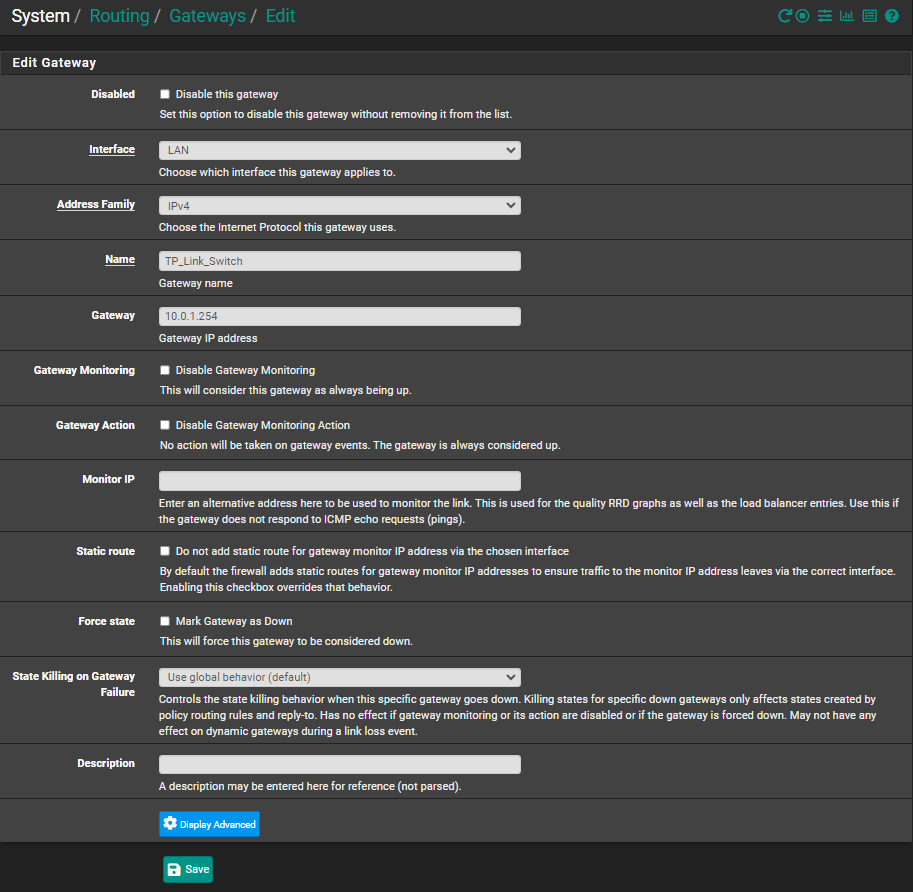
Create a Gateway (System–>Routing–>Gateways):
- Interface should be LAN
- Address Family is IPv4
- Name – Something meaningful like TP-Link_Switch
- Gateway IP address should be what the L3 switch transit IP is, e.g. 10.0.1.254
Now, we have a gateway defined, but pfSense still doesn’t know what type of traffic to expect/handle. So, go into System–>Routing–>Static Routes and define one or more static routes.
- Click Add
- Destination Network should be one or more of the VLAN IP ranges on the L3 switch. e.g. 192.168.20.0/24
- Gateway should be set to the gateway we just defined, e.g. TP-Link_Switch
- Give it some meaningful description
- Save
Assign a static IP to pfSense on the LAN side with a gateway IP defined on pfsense using the IP on the L3 gateway for the network that connects to a port on the L3 switch’s DHCP VLAN. No VLANs are defined in pfSense.
pfSense needs to have a gateway or gateways defined for your networks defined on your L3 switch. You also need to add firewall rules for the gateways to allow internet access as pfsense blocks all traffic other than pfsense traffic.
pfSense gateways will point to the IP address on the L3 switch which connects to pfsense.
The LAN side of pfsense firewall needs to allow for all networks on the L3 switch. I have the pfsense WAN interface set as the default gateway for pfsense.
Leave a Reply